Introduction
Crypto mining — the process of using computing power to validate blockchain transactions and earn newly created coins as a reward — has fascinated beginners and tech enthusiasts for over a decade. But in 2026, is it still possible to mine cryptocurrency profitably from your home?
The short answer: yes, but it depends heavily on what you mine, what hardware you use, and how much you pay for electricity.
In this step-by-step guide, you'll learn exactly how home crypto mining works, what equipment you need, how to calculate profitability, and what the realistic risks are before you spend a single dollar on hardware.
What is Crypto Mining?
- Introduction
- What is Crypto Mining?
- Is Crypto Mining Still Profitable in 2026?
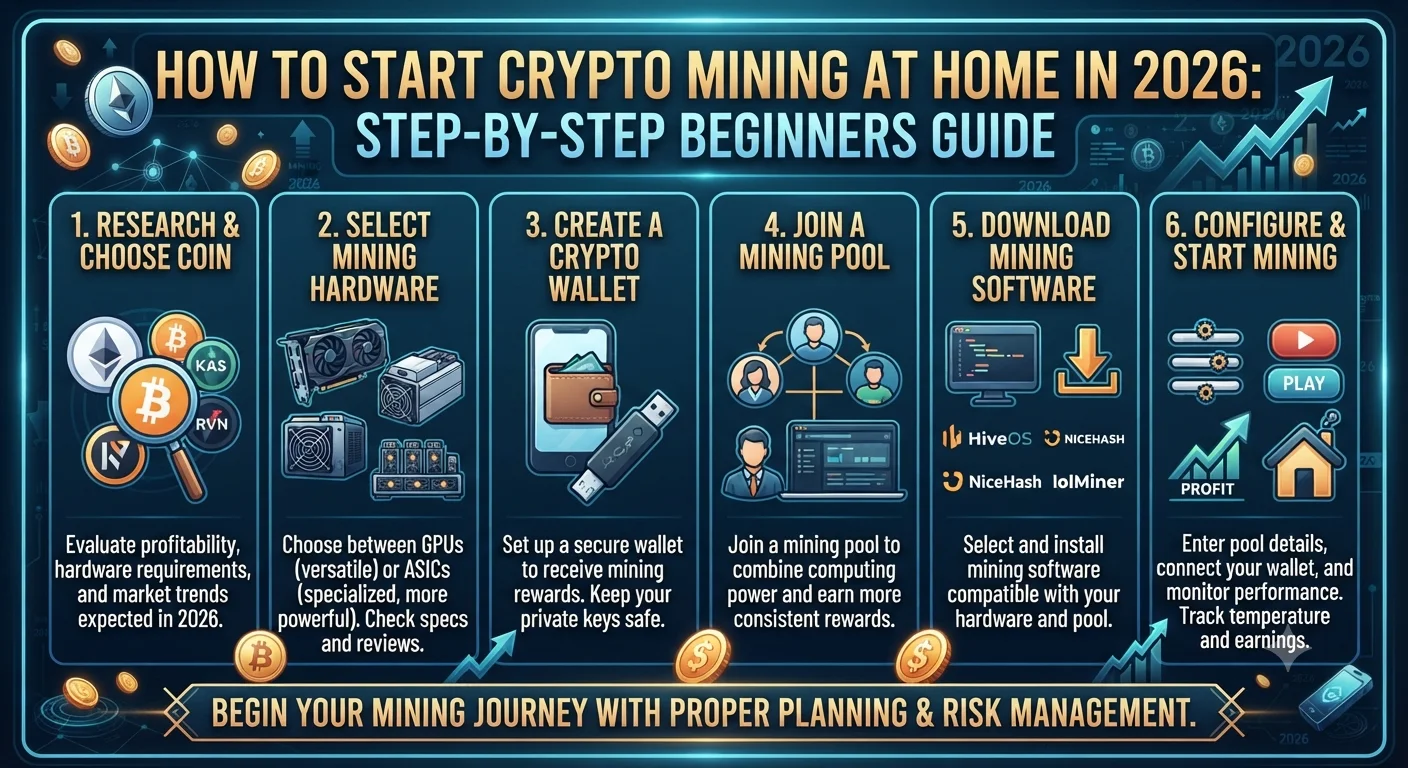
- Step 1: Choose What to Mine
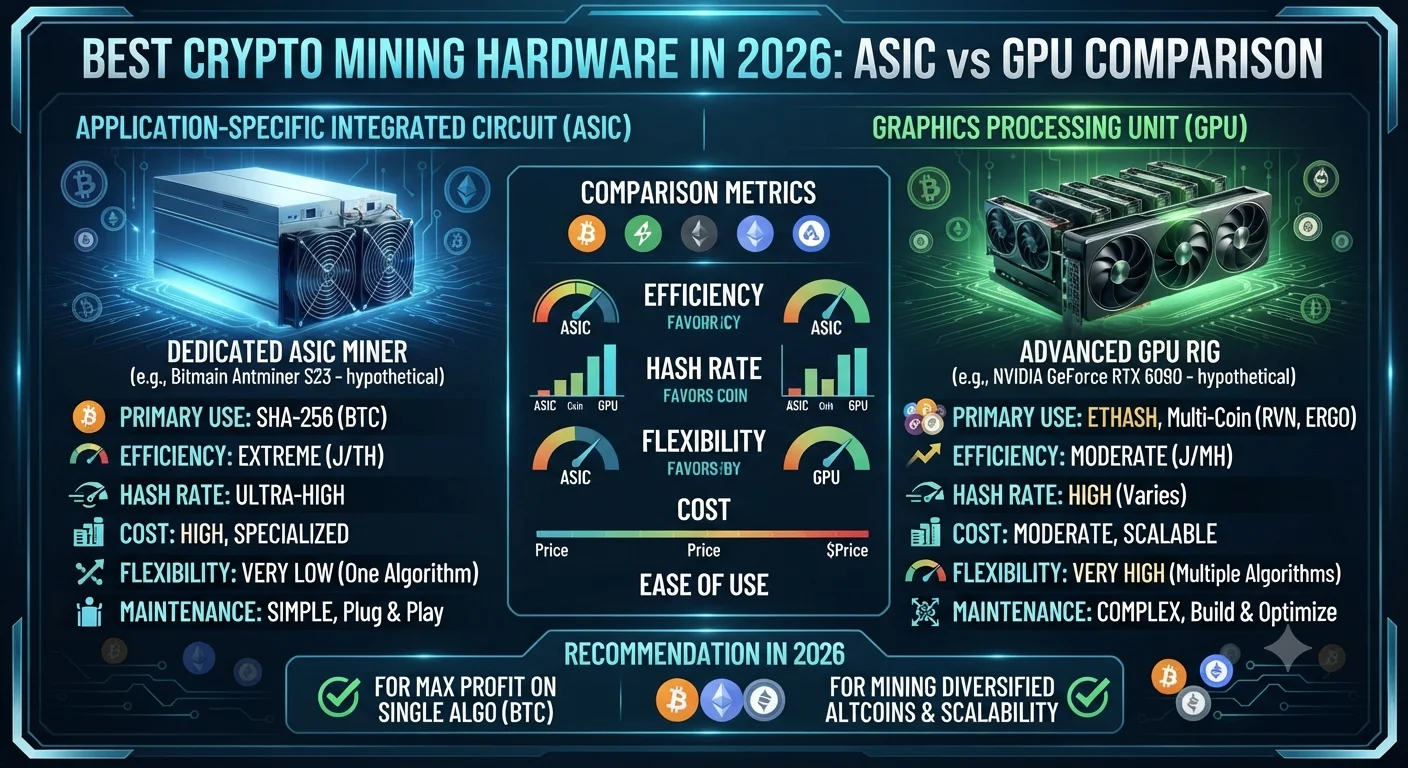
- Step 2: Choose Your Mining Hardware
- Option A: GPU Mining (Graphics Cards)
- Option B: CPU Mining
- Option C: ASIC Mining
- Step 3: Set Up Your Mining Rig
- What You Need:
- Physical Setup Tips:
- Step 4: Choose Mining Software
- Step 5: Join a Mining Pool
- Step 6: Calculate Your Profitability
- Step 7: Set Up a Crypto Wallet
- Realistic Risks of Home Crypto Mining
- Is Home Crypto Mining Worth It in 2026?
- Summary
- Frequently Asked Questions (FAQ)
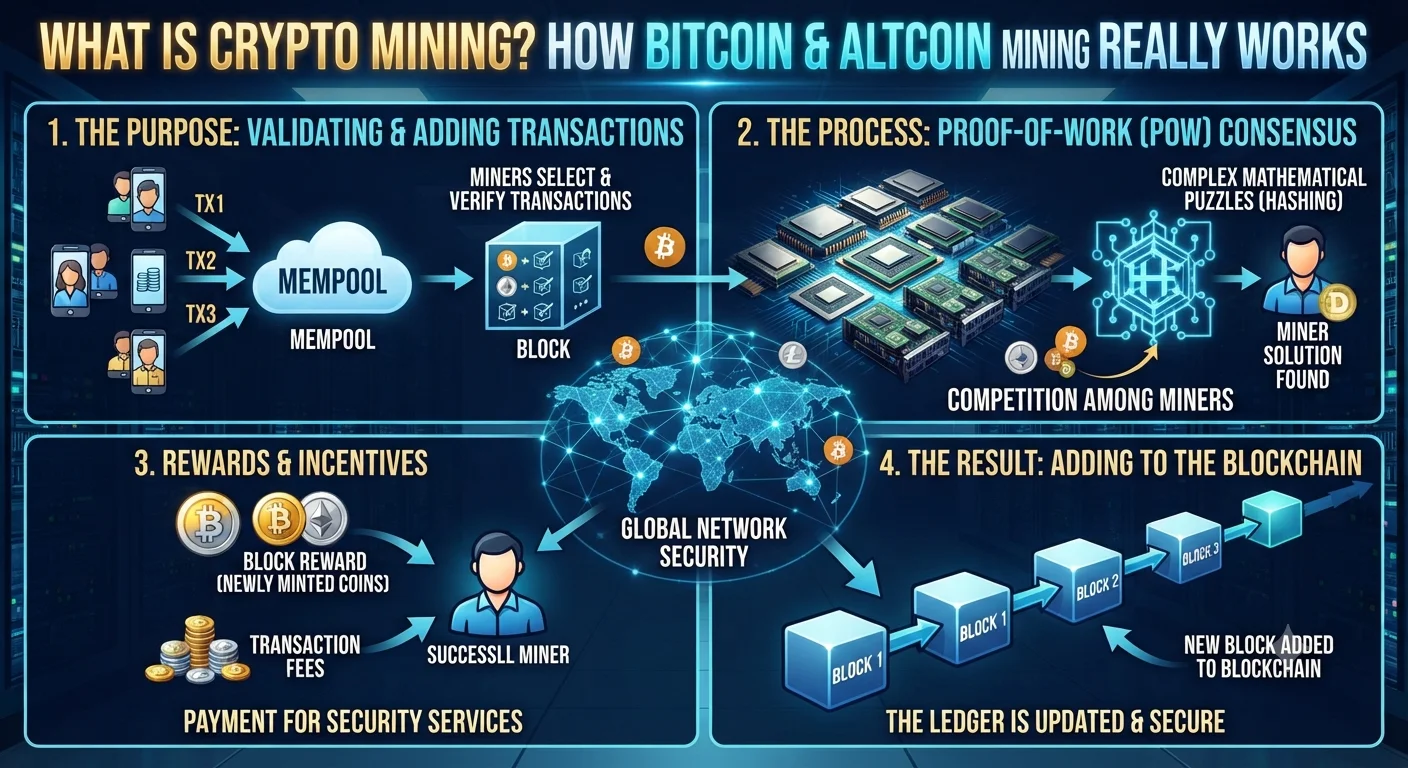
Crypto mining is the process by which new transactions are verified and added to a blockchain ledger. Miners use specialized computer hardware to solve complex mathematical puzzles. The first miner to solve the puzzle gets to add the next block of transactions to the blockchain and receives a block reward — newly created cryptocurrency — as payment.
This system is called Proof of Work (PoW), and it is the foundation of Bitcoin and several other major cryptocurrencies.
When you mine at home, your computer essentially competes with thousands of other miners worldwide. The more computing power (called hashrate) you contribute, the greater your share of the rewards.
Is Crypto Mining Still Profitable in 2026?
Mining profitability in 2026 depends on three key variables:
- Coin price — The higher the price of the cryptocurrency, the more valuable your block rewards are
- Mining difficulty — As more miners join the network, the difficulty increases, reducing individual earnings
- Electricity cost — Mining is energy-intensive; electricity is usually your biggest ongoing expense
General rule: If your electricity cost per kWh is above $0.10–$0.12, GPU mining most coins becomes unprofitable. Countries and regions with cheaper electricity (under $0.07/kWh) are most favorable for home mining.
Bitcoin mining at home in 2026 is not practical with consumer hardware — it requires industrial-grade ASIC machines and extremely cheap power. However, several alternative coins remain mineable with GPUs at home.
Step 1: Choose What to Mine
Not all cryptocurrencies are mineable, and not all are profitable to mine at home. Here are the most realistic options for home miners in 2026:
| Cryptocurrency | Algorithm | Hardware | Difficulty | Home Mining Viable? |
|---|---|---|---|---|
| Bitcoin (BTC) | SHA-256 | ASIC only | Extremely High | No (for most) |
| Ethereum Classic (ETC) | Etchash | GPU | Medium | Yes |
| Monero (XMR) | RandomX | CPU/GPU | Low-Medium | Yes |
| Ravencoin (RVN) | KawPoW | GPU | Medium | Yes |
| Litecoin (LTC) | Scrypt | ASIC/GPU | High | Marginal |
| Kaspa (KAS) | kHeavyHash | GPU/ASIC | High | Marginal |
Best beginner recommendation for 2026: Monero (XMR) is one of the most accessible coins to mine at home because it can be mined with a regular CPU or GPU, requires no specialized ASIC hardware, and has a dedicated privacy-focused community that actively supports CPU mining.
Step 2: Choose Your Mining Hardware
Your hardware choice determines your hashrate, your electricity consumption, and ultimately your profit or loss.
Option A: GPU Mining (Graphics Cards)
GPU mining uses your computer's graphics card to mine. It is the most flexible option for home miners because GPUs can mine many different coins.
Top GPUs for mining in 2026:
| GPU | Hashrate (ETHash) | Power Draw | Approx. Cost |
|---|---|---|---|
| NVIDIA RTX 4070 | ~45 MH/s | ~100W | $500–600 |
| NVIDIA RTX 3080 | ~98 MH/s | ~220W | $350–450 (used) |
| AMD RX 6800 XT | ~64 MH/s | ~130W | $300–400 (used) |
| NVIDIA RTX 3060 Ti | ~60 MH/s | ~120W | $250–350 (used) |
Hashrates vary by coin and driver version. Check WhatToMine.com for current figures.
Option B: CPU Mining
CPU mining uses your computer's processor. It is only viable for a handful of coins — most notably Monero (XMR). Returns are modest but the barrier to entry is very low since you already own a CPU.
Option C: ASIC Mining
ASIC (Application-Specific Integrated Circuit) miners are purpose-built machines designed to mine one specific algorithm at extremely high efficiency. They are far more powerful than GPUs but also more expensive ($1,000–$10,000+) and can only mine one type of coin.
Best for: Serious miners who want to mine Bitcoin or Litecoin at scale. Not recommended for casual home miners due to cost, noise, and heat.
Step 3: Set Up Your Mining Rig
Once you've chosen your hardware, follow these steps to get your mining rig running:
What You Need:
- Mining hardware (GPU, CPU, or ASIC)
- A compatible motherboard and power supply (for GPU rigs)
- At least 4GB RAM
- A solid-state drive (SSD) — 120GB is sufficient
- A stable internet connection
- Mining software (see Step 4)
- A crypto wallet to receive your earnings
Physical Setup Tips:
- Place your rig in a well-ventilated area — mining hardware generates significant heat
- Keep the area clean and dust-free (dust clogs fans and causes overheating)
- Use a UPS (Uninterruptible Power Supply) to protect against power outages
- Monitor temperatures constantly — GPUs should stay below 80°C
Step 4: Choose Mining Software
Mining software connects your hardware to the blockchain network (or mining pool) and manages the mining process. Different software suits different hardware:
| Software | Best For | Operating System | Fee |
|---|---|---|---|
| NiceHash | Beginners, auto-selects coin | Windows | 2% |
| PhoenixMiner | GPU mining (ETHash) | Windows/Linux | 0.65% |
| XMRig | Monero CPU/GPU mining | Windows/Linux/Mac | 0% (donate) |
| lolMiner | AMD & NVIDIA GPU | Windows/Linux | 0.7–1% |
| TeamRedMiner | AMD GPU | Windows/Linux | 0.75% |
Best for absolute beginners: NiceHash automatically mines whichever coin is most profitable at any moment and pays you in Bitcoin. It has a simple GUI interface and is ideal if you don't want to configure everything manually.
Recommended Articles
 CRYPTO MINING
 CRYPTO MINING
 CRYPTO MINING
Step 5: Join a Mining Pool
Unless you have enormous computing power, solo mining is not realistic. Your chances of finding a block alone are extremely small. This is why most home miners join a mining pool — a group of miners who combine their hashrate and share rewards proportionally.
Popular mining pools in 2026:
| Pool | Supported Coins | Fee | Payout Method |
|---|---|---|---|
| F2Pool | BTC, ETH Classic, LTC, many more | 1–3% | PPS / PPLNS |
| NiceHash Pool | Multiple | 2% | BTC |
| 2Miners | ETC, ZEC, XMR, RVN | 1% | PPLNS |
| SupportXMR | Monero (XMR) | 0.6% | PPLNS |
| Nanopool | ETC, XMR, RVN | 1% | PPLNS |
When choosing a pool, consider: pool size (larger = more consistent payouts), fee structure, payout frequency, and minimum payout threshold.
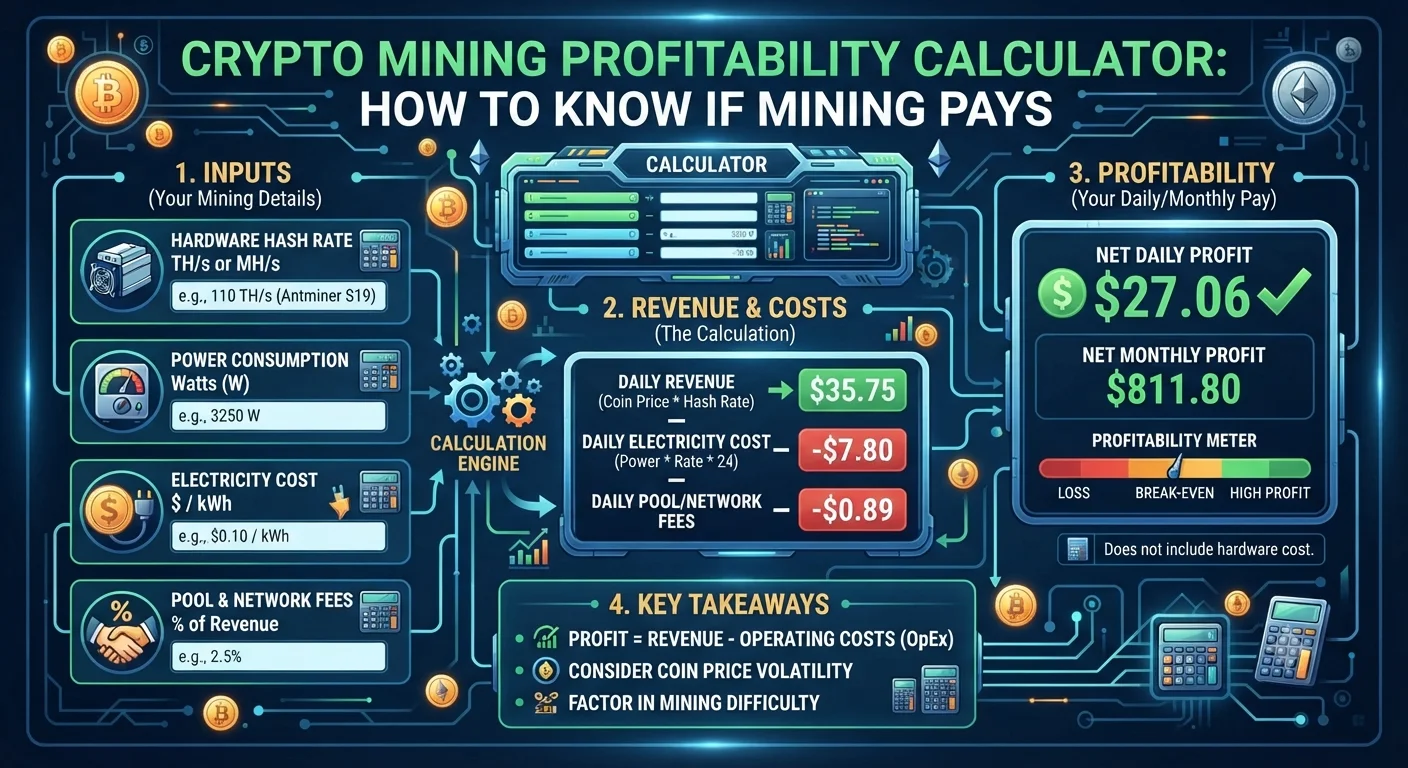
Step 6: Calculate Your Profitability
Before spending money on hardware, always calculate whether mining will be profitable for you. Use this simple formula:
Daily Profit = (Daily Coin Earnings × Coin Price) − Daily Electricity Cost
Example calculation:
- GPU: NVIDIA RTX 3080 mining Ethereum Classic (ETC)
- Hashrate: 32 MH/s
- Power consumption: 220W
- Electricity cost: $0.10/kWh
- Daily power cost: 0.22 kW × 24 hours × $0.10 = $0.53/day
- Daily ETC earnings (estimated): 0.15 ETC
- ETC price (hypothetical): $25
- Daily coin earnings: 0.15 × $25 = $3.75
- Daily profit: $3.75 − $0.53 = $3.22
- Monthly profit: ~$96.60
Always use live calculators such as WhatToMine.com or CryptoCompare Mining Calculator since coin prices and difficulty change daily.
Step 7: Set Up a Crypto Wallet
You need a crypto wallet to receive your mining rewards. Never leave your earned coins sitting on an exchange or in your mining pool account for long periods.
Recommended wallet types:
- Software wallets (free): Exodus, Trust Wallet, Electrum (Bitcoin)
- Hardware wallets (most secure): Ledger Nano X, Trezor Model T
Make sure your wallet supports the specific coin you are mining. Always back up your seed phrase in a secure offline location.
Realistic Risks of Home Crypto Mining
Before you invest in hardware, understand these real risks:
1. Hardware costs vs. return timeline
A mid-range GPU rig can cost $1,500–$3,000 to build. At $3/day profit, your break-even point is 500–1,000 days — nearly 3 years. Coin prices or mining difficulty could change dramatically in that time.
2. Electricity bills
Mining hardware runs 24/7. A rig drawing 500W costs approximately $36/month at $0.10/kWh. Always calculate your full electricity cost before starting.
3. Hardware wear and depreciation
Mining puts constant stress on your GPU. This can shorten the hardware's lifespan and reduces its resale value.
4. Regulatory risk
Some countries have restricted or banned crypto mining. Always check the legal status of mining in your country before investing.
5. Coin price volatility
If the coin you mine drops 50% in value, your profitability drops by 50% overnight — even if your hashrate and electricity costs stay the same.
Is Home Crypto Mining Worth It in 2026?
Home crypto mining can still be worth it in 2026 if:
- Your electricity cost is below $0.08/kWh
- You already own suitable GPU hardware (so no upfront hardware cost)
- You mine a coin that is profitable at current difficulty and price
- You treat it as a supplementary income, not a primary one
- You have a long-term outlook and aren't relying on short-term returns
For most people in high-electricity-cost countries, home mining is a learning experience rather than a reliable income stream. However, for those in regions with cheap power and existing hardware, it remains a viable and interesting way to earn crypto passively.
Summary
Starting crypto mining at home in 2026 is entirely possible, but it requires careful research and realistic expectations. Here are the key steps:
- Choose a mineable coin (Monero or Ethereum Classic are great starting points)
- Select your hardware (GPU for flexibility, ASIC for Bitcoin)
- Set up your rig in a cool, ventilated space
- Install mining software (NiceHash for beginners)
- Join a reputable mining pool
- Calculate profitability using live tools before spending money
- Set up a secure crypto wallet for your rewards
Frequently Asked Questions (FAQ)
Can I mine crypto at home in 2026?
Yes, it is possible to mine certain cryptocurrencies at home in 2026 using a GPU or CPU. Monero (XMR) and Ethereum Classic (ETC) are among the most accessible options. Bitcoin mining at home is generally not viable without industrial ASIC hardware and very cheap electricity.
How much does it cost to start mining crypto at home?
A basic home mining setup with a single mid-range GPU costs between $300 and $700. A multi-GPU mining rig can cost $1,500 to $3,000 or more. You also need to factor in ongoing electricity costs, which typically range from $30 to $100+ per month depending on your hardware and local rates.
What is the easiest crypto to mine at home?
Monero (XMR) is widely considered the easiest and most accessible cryptocurrency to mine at home because it uses the RandomX algorithm, which is specifically designed to favour consumer CPUs and GPUs over specialized ASIC hardware.
How long does it take to mine 1 Bitcoin at home?
Mining a full Bitcoin at home with consumer hardware is not realistically achievable. With a single high-end GPU, it could theoretically take thousands of years due to Bitcoin's extreme mining difficulty. Bitcoin mining requires industrial ASIC machines and is dominated by large mining farms.
Is crypto mining legal?
Crypto mining is legal in most countries, including the US, UK, Canada, and most of Europe. However, some countries such as China, Algeria, and Egypt have banned or restricted it. Always verify the legal status of mining in your specific country before investing in equipment.
Does crypto mining damage your GPU?
Mining puts continuous load on your GPU, which can increase wear over time compared to casual gaming use. However, if you mine at optimized power settings (undervolting) and maintain proper cooling, GPUs used for mining can last for several years. Overheating is the primary risk to avoid.